Diagram Notation Selection — C4 vs PlantUML vs Mermaid
First Published:
Last Updated:
This article compares the three text notations that account for the overwhelming majority of architecture diagrams written today — the C4 model, PlantUML, and Mermaid — and gives a use-case-by-use-case recommendation. To make the comparison concrete, I render the same toy system in all three notations side by side, then walk through the tooling and renderer compatibility matrix that actually drives the choice in practice. The intended reader is an engineer or tech lead who is about to commit to one notation for a team or repository and wants to do that with their eyes open.
I assume you already know what UML is, that you have written at least one Mermaid diagram in a GitHub README, and that you have heard the phrase "C4 model" but may not have used it in anger. I will not teach the full syntax of any of the three notations — the official sites do that better — but I will point at the parts that determine the selection.
Why Diagrams as Code
Three forces, taken together, are why text-based notations have replaced the GUI tools they were supposed to complement.The first is review. Once a diagram lives in a
.mmd or .puml or .dsl file in the repository, a change to it shows up as a normal pull-request diff. A reviewer can comment on individual lines, the author can respond, and the change is recorded in the same git history as the code it describes. With a binary GUI export, the same review happens on a flattened image — which means it does not happen.The second is renderer ubiquity. Five years ago, viewing a Mermaid diagram still required a plug-in. Today GitHub renders Mermaid in any Markdown file natively, GitLab does the same, VS Code ships a Markdown preview that covers the common diagram types, and the major static-site generators (MkDocs, Docusaurus, Hugo) have first-class plug-ins. PlantUML lags slightly because it depends on a Java back-end, but the Kroki and PlantUML web servers have made render-from-text a one-line embed for any platform that allows custom fetchers. The cost of looking at a diagram has collapsed.
The third is AI-assisted authoring. Large language models are dramatically better at producing or modifying text DSLs than at editing a
.drawio XML by hand or driving a GUI. A team that maintains its diagrams as code can ask the model to "add an SQS DLQ to the order pipeline diagram" and the patch comes back as a textual diff that a human can review. With a GUI tool, the same request becomes "regenerate the whole image" and the human cannot review what changed. Structurizr's tagline — "Models as code — manual layout — AI friendly" — explicitly names this as a design goal.None of this is an argument against GUI tools. Lucidchart, draw.io, and the Apple of GUI diagramming, OmniGraffle, are still better than text DSLs for one-off pictures, for marketing diagrams that need precise positioning, and for teams that include non-engineers as primary authors. The argument is that for diagrams that travel with the code — architecture overviews, sequence diagrams describing a feature, state machines for a workflow, ER diagrams for a schema — text wins on review, version control, and machine-readability.
The choice that remains is which text notation to use. That is the rest of this article.
C4 Model — Strengths and Weaknesses
The C4 model, created by Simon Brown, is technically not a notation. The official site is explicit on this point: C4 is "notation independent" and "tooling independent", and describes itself as "an easy to learn, developer friendly approach to software architecture diagramming". What C4 prescribes is a four-level hierarchy of abstractions; what notation you use to actually draw the boxes is up to you.The four levels are:
- System Context — Your system as a single box, surrounded by the people and external systems it interacts with. The audience is non-technical stakeholders.
- Container — Your system zoomed in to its deployable units (web app, mobile app, API, database, message bus). The audience is technical staff inside or outside the team.
- Component — A single container zoomed in to its internal modules or services. The audience is engineers working on that container.
- Code — Optional. Class diagrams or similar at the implementation level. The audience is engineers reading the code; in practice this level is generated from the source itself rather than maintained by hand.
The strength of C4 is that it gives you a vocabulary for the question "what kind of diagram am I drawing right now". Without it, "architecture diagram" can mean anything from a single rectangle labeled "AWS" to a UML deployment diagram with every IAM role attached. A reviewer who sees "this is a Container diagram" knows the level of abstraction to expect, and can object meaningfully when an internal class shows up in a System Context view.
C4 is also opinionated about what NOT to draw. The Code level is explicitly optional and the official guidance is to skip it unless you have a reason. The Component level is for engineers in the team; you should not show it to a stakeholder. This discipline is what makes C4 architectural review tractable.
Its weakness is that C4 alone is incomplete: you still need a notation to render the boxes. The reference implementation is Structurizr, also from Simon Brown, with its own DSL — but in practice most teams reach for one of three combinations: C4-PlantUML (a macro library on top of PlantUML), Mermaid's built-in C4 diagram type, or Structurizr DSL rendered to PlantUML or Mermaid via the Structurizr CLI. The C4 model itself is therefore best understood as a methodology that wraps another notation, not as a competitor to PlantUML or Mermaid.
The other practical weakness is that C4 covers only the structural levels. Sequence diagrams, state machines, ER diagrams, and flowcharts — all of which an architecture document needs — fall outside C4 and need to be drawn in PlantUML, Mermaid, or another notation anyway. A team that adopts "C4 only" finds itself reaching for a second notation within a week.
PlantUML — Strengths and Weaknesses
PlantUML is the oldest of the three text notations still in active use. It positions itself as "an open-source tool that uses simple textual descriptions to draw beautiful UML diagrams", and its diagram-type catalog is the broadest of any notation considered here.The supported types include all nine UML diagram families — sequence, use case, class, object, activity, component, deployment, state, and timing — plus a long tail of non-UML diagrams: JSON and YAML structure visualizations, EBNF grammars, regular-expression diagrams, network diagrams (nwdiag), wireframes (Salt), Archimate, Gantt charts, mind maps, work breakdown structures, mathematics (AsciiMath / JLaTeXMath), entity-relationship diagrams, information-engineering diagrams, generic charts, and file-tree diagrams. If you can name a "boxes-and-lines" diagram, PlantUML probably has a syntax for it.
For C4 specifically, the community-maintained C4-PlantUML library — MIT-licensed and maintained under the
plantuml-stdlib organization — provides the macro set that turns plain PlantUML into a C4-compliant renderer: Person(), System(), Container(), Component(), Rel(), BiRel(), plus boundaries (System_Boundary, Container_Boundary) and specialized database variants (SystemDb, ContainerDb, ComponentDb). C4-PlantUML covers the four canonical levels plus Dynamic, Sequence, and Deployment views.The strengths of PlantUML are therefore breadth, depth of the C4 ecosystem, and a long-running render pipeline that handles edge cases (large diagrams, complex layouts) better than any browser-side tool can.
Its weaknesses are operational. PlantUML is a Java application that delegates layout to Graphviz's
dot binary by default. To render a .puml file locally you need a JRE installed; to render it in CI you need a Docker image with Java and Graphviz; to render it in a browser you need a server-side renderer (the public PlantUML Server, a self-hosted PlantUML instance, or a Kroki instance). Compared with Mermaid — where rendering is a JavaScript library that runs client-side — PlantUML's runtime story is significantly heavier. Recent PlantUML versions ship a pure-Java layout engine called Smetana that removes the Graphviz dependency at the cost of some layout quality, which is useful for slim CI containers that cannot install dot; you opt in per diagram with !pragma layout smetana.The renderer dependency also leaks into the most common failure mode. A diagram that renders in your IDE may render differently or not at all on the GitHub web view, because the public renderers periodically lag the latest stdlib release, and because some platforms (notably GitHub Markdown) do not have native PlantUML support and require an embedded image link via PlantUML Server or Kroki. The image-link approach works but loses the "diff in a PR" property that motivated diagrams as code in the first place — the reviewer sees the link, not the rendered diagram.
Mermaid — Strengths and Weaknesses
Mermaid is the youngest of the three but has the highest adoption, driven almost entirely by one fact: GitHub renders it natively in Markdown. The GitHub blog announcement on February 14, 2022 made```mermaid code-fence blocks render inline in any Markdown file, README, issue, PR description, or comment. Within a year the same affordance landed in GitLab, Notion, Obsidian, and most static-site generators.Mermaid describes itself as "a JavaScript based diagramming and charting tool that renders Markdown-inspired text definitions to create and modify diagrams dynamically", and the official intro is explicit that the syntax was designed for Markdown literacy: "If you are familiar with Markdown you should have no problem learning Mermaid's Syntax."
The diagram catalog, while not as wide as PlantUML's, is broader than most people realize. The supported types now include flowchart, sequence, class, state, entity-relationship, Gantt, pie, gitGraph, requirement, user journey, timeline, mindmap, Sankey, C4 (experimental), quadrant chart, ZenUML, block, packet, kanban, architecture, radar, treemap, venn, ishikawa, and tree-view diagrams. The C4 support is labeled experimental and lags C4-PlantUML in macro coverage, but for System Context and Container views it is usually sufficient.
The strength of Mermaid is therefore that "in the browser, on the platform you already use" is its default. No Java, no Graphviz, no Docker image, no server-side renderer, no markup-to-image link. You paste the code into a Markdown file, push, and the diagram renders. The cost-to-author and cost-to-reader are both close to zero, which is a different category of friction than PlantUML lives in.
Its weaknesses are layout quality, expressive ceiling, and version drift. The Mermaid auto-layout works well for diagrams of up to ten or fifteen nodes; past that, edge crossings and label collisions degrade quickly. PlantUML's Graphviz back-end handles much larger diagrams. For sequence diagrams, Mermaid's syntax has gaps that PlantUML covers: nested activations, return-arrow numbering, complex critical sections. For class diagrams, Mermaid lacks visibility modifiers' rendering nuance and template-class notation. Most of these gaps are slow to close because Mermaid prioritizes browser-renderability over notation completeness.
The version-drift problem is that the GitHub-bundled Mermaid version is not the latest, so a diagram that renders correctly in the live editor can fail on github.com. Lock the syntax to features supported by the GitHub-bundled version (you can find the version by inspecting the rendered SVG's
data-mermaid-version attribute) or limit yourself to the older subset.Note: If you want to experiment with Mermaid syntax against a live renderer that matches the version you intend to ship to, the in-site Mermaid Diagram Live Editor on this site renders client-side and exports SVG and PNG. It is useful for prototyping before committing to a notation.
Same Diagram, Three Notations
The fairest way to compare three notations is to render the same system in each. The toy system is a typical web application: a user reaches a public CDN, the CDN forwards to an API, the API reads and writes a database, and the API publishes domain events to a message bus.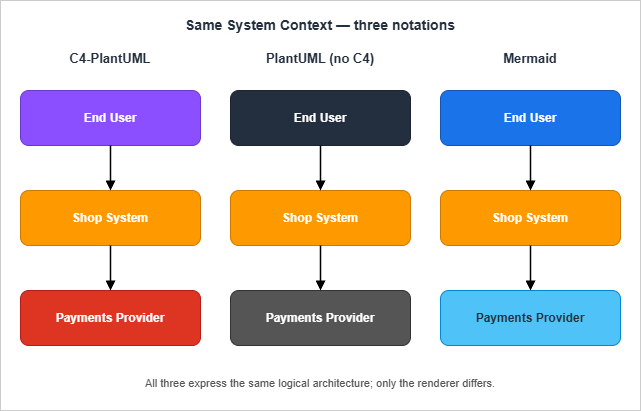
System Context Level
The System Context diagram answers "who uses my system, and what does it talk to". A correct System Context view at the C4 level shows the system as one box, the user as a person, and external systems (CDN, message-bus consumer) as other boxes — but does not zoom into the database, API, or web tier.C4-PlantUML:
@startuml
!include https://raw.githubusercontent.com/plantuml-stdlib/C4-PlantUML/v2.13.0/C4_Context.puml

Person(user, "End User", "Browses the catalogue and places orders.")
System(shop, "Shop System", "Lets users browse and order products.")
System_Ext(payments, "Payments Provider", "Authorises card transactions.")
System_Ext(analytics, "Analytics Pipeline", "Consumes domain events.")

Rel(user, shop, "Browses, orders")
Rel(shop, payments, "Authorises payment", "HTTPS / JSON")
Rel(shop, analytics, "Publishes order events", "EventBridge")
@enduml
Mermaid (C4 experimental):
C4Context
  title Shop System Context
  Person(user, "End User", "Browses the catalogue and places orders.")
  System(shop, "Shop System", "Lets users browse and order products.")
  System_Ext(payments, "Payments Provider", "Authorises card transactions.")
  System_Ext(analytics, "Analytics Pipeline", "Consumes domain events.")
  Rel(user, shop, "Browses, orders")
  Rel(shop, payments, "Authorises payment", "HTTPS / JSON")
  Rel(shop, analytics, "Publishes order events", "EventBridge")
The two are intentionally near-identical. C4-PlantUML's macros and Mermaid's C4 syntax both descend from Simon Brown's vocabulary, so the source of truth is the same; only the renderer differs. In practice, the C4-PlantUML version produces a more polished diagram because the underlying Graphviz layout has had more time to mature.
Plain PlantUML (no C4 macros):
@startuml
left to right direction
actor "End User" as user
rectangle "Shop System" as shop #FF9900
rectangle "Payments\nProvider" as payments
rectangle "Analytics\nPipeline" as analytics
user --> shop : Browses, orders
shop --> payments : Authorises payment
shop --> analytics : Publishes order events
@enduml
The plain-PlantUML version omits the C4 vocabulary, so the diagram still renders but the reviewer no longer sees the "this is a Context view" cue. Whether that matters depends on whether the team has agreed to C4. If they have, the macro version is unambiguous; if they have not, the plain version is one fewer dependency.
Container Level
The Container diagram zooms one level in: the Shop System is unfolded into a web app, an API, and a database, with the message bus shown as the integration point.C4-PlantUML:
@startuml
!include https://raw.githubusercontent.com/plantuml-stdlib/C4-PlantUML/v2.13.0/C4_Container.puml

Person(user, "End User")
System_Boundary(shop, "Shop System") {
  Container(web, "Web App", "React on CloudFront", "Single-page app served from S3 origin.")
  Container(api, "API", "Python / FastAPI on ECS Fargate", "Catalogue, cart, orders.")
  ContainerDb(db, "Order DB", "Amazon Aurora PostgreSQL", "Stores carts and orders.")
  Container(bus, "Event Bus", "Amazon EventBridge", "Publishes order.* events.")
}
System_Ext(payments, "Payments Provider")

Rel(user, web, "Uses", "HTTPS")
Rel(web, api, "Calls", "HTTPS / JSON")
Rel(api, db, "Reads / writes", "SQL")
Rel(api, bus, "Publishes", "EventBridge PutEvents")
Rel(api, payments, "Authorises payment", "HTTPS / JSON")
@enduml
Mermaid (flowchart, C4 experimental does not yet handle nested boundaries cleanly):
flowchart LR
  user(["End User"]) -->|HTTPS| web
  subgraph shop["Shop System"]
    web[Web App<br/>React on CloudFront]
    api[API<br/>FastAPI on ECS Fargate]
    db[(Order DB<br/>Aurora PostgreSQL)]
    bus[[Event Bus<br/>EventBridge]]
    web -->|HTTPS / JSON| api
    api -->|SQL| db
    api -->|PutEvents| bus
  end
  api -->|HTTPS| payments[Payments Provider]
The trade-off here is visible. C4-PlantUML's
System_Boundary macro produces a labeled enclosing rectangle with the canonical C4 styling for free. The Mermaid subgraph achieves the same visual effect but the C4 vocabulary is absent — a reviewer cannot tell at a glance that the subgraph represents a System Boundary in the C4 sense. For a team that has standardized on C4 vocabulary, this is a real loss.Sequence Level
Sequence diagrams describe a single interaction over time and are not part of C4. Both PlantUML and Mermaid support them natively.PlantUML sequence:
@startuml
actor User
participant "Web App"  as Web
participant "API"      as API
participant "Order DB" as DB
participant "Event Bus" as Bus

User -> Web : Place order
activate Web
Web -> API : POST /orders
activate API
API -> DB  : INSERT order
DB --> API : order_id
API -> Bus : PutEvents(order.placed)
Bus --> API : 200 OK
API --> Web : 201 { order_id }
deactivate API
Web --> User : Order confirmed
deactivate Web
@enduml
Mermaid sequence:
sequenceDiagram
  actor User
  participant Web as Web App
  participant API
  participant DB as Order DB
  participant Bus as Event Bus

  User->>Web: Place order
  Web->>API: POST /orders
  API->>DB: INSERT order
  DB-->>API: order_id
  API->>Bus: PutEvents(order.placed)
  Bus-->>API: 200 OK
  API-->>Web: 201 { order_id }
  Web-->>User: Order confirmed
The two are visually equivalent for this scale of diagram. PlantUML's sequence syntax is more expressive once you reach 30+ messages — nested activations, alt/par/critical sections, return labels, ordered numbering — but for the typical "one feature, one diagram" scope that lands in a PR, Mermaid is sufficient and renders inline on GitHub.
Tooling and Renderer Compatibility
The notation choice is downstream of where the diagram needs to render. The compatibility matrix below records the situation as of 2026; entries marked — mean "no native support; requires a third-party app or external image link". The checkmarks are deliberately strict: I count "renders the source text inline without a manual export step" as native, and everything else as not native.* You can sort the table by clicking on the column name.
| Renderer / Platform | Mermaid | PlantUML | C4 (via macros) | Notes |
|---|---|---|---|---|
| GitHub (Markdown, README, PR, Issue) | Native | — | Via PlantUML or Mermaid C4 | Mermaid since Feb 2022; PlantUML requires Kroki link or rendered image |
| GitLab (Markdown, MR, Issue) | Native | Via Kroki integration | Via PlantUML or Mermaid C4 | Self-managed instances can enable PlantUML server |
| Bitbucket Cloud | — | — | — | Marketplace apps required |
| Notion | Native (since 2024) | — | Via Mermaid C4 | Use a code block with mermaid language |
| Confluence Cloud | Marketplace app | Marketplace app | Via app | No native built-in; common apps include draw.io and Mermaid for Confluence |
| Confluence Data Center | Marketplace app | Marketplace app | Via app | Same as Cloud — apps differ in pricing and feature parity |
| VS Code (preview) | Built-in Markdown preview | Extension required | Both via extensions | Markdown preview Mermaid since v1.92 |
| JetBrains IDEs | Plugin | Plugin | Both via plugins | PlantUML integration is mature; Mermaid plugin is newer |
| Obsidian | Native | Plugin | Via Mermaid C4 | Mermaid renders in any markdown note |
| MkDocs / Material | Native (with plugin) | Plugin | Both via plugins | pymdownx.superfences enables Mermaid |
| Docusaurus | Native (theme-mermaid) | Plugin | Both | @docusaurus/theme-mermaid shipped with v2.0 (2022) |
| draw.io / diagrams.net | Import only | Import only | Import only | Imports text, then becomes a draw.io file (loses round-trip) |
| Slack | — | — | — | Paste a rendered image; no notation is native |
The pattern is clear. Mermaid wins on browser-native renderer reach, especially across the platforms (GitHub, GitLab, Notion, Obsidian, Markdown previews) where engineers actually read documents day-to-day. PlantUML wins on diagram-type breadth and on layout quality at scale, but only when the rendering pipeline is set up — which means a self-hosted PlantUML server, Kroki, or a CI step that produces images. C4 itself is renderer-agnostic and inherits whichever back-end you point it at.
Decision Matrix by Use Case
The renderer matrix above is necessary but not sufficient. The next question is which notation matches the use case in front of you.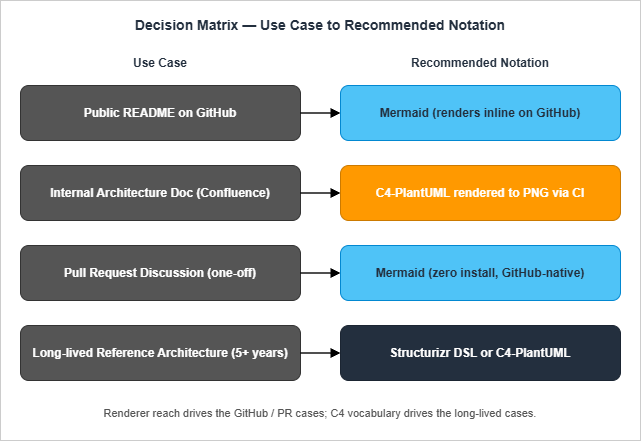
Use Case 1 — Public README on GitHub
Recommendation: Mermaid. The reader's renderer is the GitHub web view, and Mermaid renders inline without any setup on either the author's or the reader's side. PlantUML on a public README forces an image link or a build step, and "image link to a public PlantUML server" leaks your diagram source to a third party every time someone opens the README. C4 vocabulary can be used via Mermaid's C4 syntax for System Context views; for Container views, fall back toflowchart with a subgraph as the boundary.Use Case 2 — Internal Architecture Document (Confluence, internal wiki)
Recommendation: C4-PlantUML rendered to PNG via CI, with the source.puml committed alongside. Confluence — Cloud or Data Center — has no native diagrams-as-code support without a Marketplace app, so the author must produce an image anyway. Producing it from PlantUML gives access to the full C4 vocabulary, the larger-scale layout, and the deployment / sequence diagrams the same document will need elsewhere. The .puml file lives in the architecture repo; CI renders the PNG and uploads it to Confluence (or links to a CDN-served image). When the diagram changes, the diff is reviewable.Use Case 3 — Pull Request Discussion (one-off explanatory diagram)
Recommendation: Mermaid. The reader's renderer is GitHub PR description / comment, and the diagram has a half-life of one merge. The cost of authoring the diagram should be measured in minutes; Mermaid wins because it requires no installation and renders inline. A flowchart or sequence diagram covers ninety percent of "what does this PR change" explanations.Use Case 4 — Long-Lived Reference Architecture (5+ years, multi-team)
Recommendation: Structurizr DSL or C4-PlantUML, never raw Mermaid. The diagram will outlive the version of any specific renderer. Structurizr DSL gives you the strongest separation between the model (the boxes and lines) and the presentation (the views you render from the model), so adding a new view five years later does not require redrawing every existing diagram. C4-PlantUML is the next-best option if you want to avoid the Structurizr CLI dependency. Mermaid is the wrong choice here because its layout engine is the weakest of the three at large scale, and because the C4 syntax is still labeled experimental — both of which create the risk that the diagram you write today will not render the same way in five years.One-Line Summary
If the diagram needs to render on GitHub or Notion, use Mermaid. If it needs C4 compliance and you can run a renderer in CI, use C4-PlantUML. If it is part of a long-lived multi-team reference architecture, use Structurizr DSL and let the CLI render it.Migrating Existing Diagrams Between Notations
A team that has been writing diagrams for a few years almost always inherits a mix: a few PlantUML files from before Mermaid was native on GitHub, a Mermaid block in the README, a hand-drawn PNG from someone's whiteboard photo, and a Structurizr workspace someone proposed but never finished. The migration question is not "which notation is best" — that is the question this article has already answered — but "what do I do with what I already have."PlantUML to Mermaid (most common direction, when the diagram only needs to live on GitHub). The translation is mostly mechanical for sequence diagrams and flowcharts: the participant declarations and arrows have direct equivalents. The friction lives in three places. First, label syntax differs (
\n versus <br/>, as covered in Common Pitfalls below). Second, PlantUML's note blocks have no Mermaid equivalent for sequence diagrams; the closest is a Note over A,B: directive that supports only single-line text. Third, anything that uses C4-PlantUML macros has no clean Mermaid translation because Mermaid's C4 syntax is still labeled experimental and supports only the System Context level reliably. For Container and Component views, you fall back to a flowchart with subgraph boundaries, which loses the C4 vocabulary. The general rule: translate when the diagram is small and tactical; rewrite when it is part of a reference architecture and the loss of vocabulary matters.Mermaid to PlantUML (less common, usually because the diagram outgrew Mermaid's layout engine). Layout quality is the usual driver. Past about fifteen nodes, Mermaid's automatic layout starts producing crossings and uneven spacing that PlantUML's Graphviz backend handles cleanly. The translation is straightforward, but it costs the GitHub-native rendering, which means committing rendered SVGs alongside the source. Decide before migrating whether the layout improvement justifies the loss of inline rendering on the README.
Hand-drawn PNG to either text notation. The right move is almost never "OCR the PNG and reconstruct the diagram"; the right move is to recreate it from scratch using the existing PNG as a reference. The original layout was probably wrong anyway — it usually is, when reviewed years later — and starting fresh forces the team to confirm that every box is still relevant. Budget twenty to thirty minutes per non-trivial diagram. The output is a text source that is reviewable, diffable, and replaceable; the input is an image file that no one will edit.
Whatever to Structurizr DSL. Treat this as a redesign rather than a migration. Structurizr's separation of model from views means you do not transcribe the diagram; you describe the architecture once and then declare which views you want rendered. The migration cost is high precisely because it is the right cost: at the end you have a single source of truth that produces five views, instead of five hand-maintained diagrams that drift in different directions. Reserve this approach for the diagrams that actually deserve it — the long-lived reference architecture from Use Case 4 above — not the throwaway flowchart on a feature branch.
Reviewing Diagram Pull Requests
Diagrams-as-code only delivers value if the review step works. A diff of.puml source is plain text, which is reviewable in principle but uninformative in practice; the reviewer needs to see the rendered before-and-after. A few practices keep the review loop honest:Render the new diagram inline on the PR description. The CI job that produces SVGs should also post a comment on the PR with both the previous and new images, side by side. This gives the reviewer the equivalent of "view rendered file" for a Markdown change. Without it, the diagram review collapses to "trust the author" and the rendered SVG drifts from the source over time.
Look at the diff of the source, not just the rendered image. The image change tells you what moved on the canvas. The source diff tells you what the author intended — whether a renamed box is a typo fix or a meaningful redesign, whether a new arrow represents a real new dependency or a layout convenience. A PR that changes a diagram should be reviewable on both axes; the image alone is not enough.
Question the abstraction level, not the box layout. The most valuable comment a reviewer can leave on a diagram PR is "this is at the wrong level" — for example, a System Context diagram that has started showing internal components, or a Container view that has degenerated into a deployment topology. Layout quality is fixable in the renderer; abstraction-level mistakes propagate into how everyone subsequently thinks about the system. Catch them at the diagram review, not three months later in a misunderstanding meeting.
Keep diagram-only PRs separate from code-only PRs when both are non-trivial. Bundling them is convenient but slows both reviews. The diagram reviewer wants to focus on the picture; the code reviewer wants to focus on the implementation. Split when either side is more than a one-line change.
When Diagrams-as-Code Is the Wrong Tool
This article has argued for diagrams as code by default, but defaults have exceptions. Three situations push toward a different tool:Whiteboarding and brainstorming. The friction of the text editor — even with Mermaid Live or a fast preview — is too high for the early-stage exploration where boxes and arrows shift every minute. A real whiteboard, or a Miro / FigJam / Excalidraw board, lets the participants think with their hands. The output of that session can then be transcribed into a text notation if it is worth keeping; if it is not worth transcribing, it was probably not worth keeping anyway.
Network and infrastructure topology. Once the diagram needs to show twenty subnets, four AZs, NAT gateways, and a Transit Gateway, neither Mermaid's layout nor PlantUML's deployment notation produces a result a reviewer can follow at a glance. AWS-specific tooling — the official AWS Architecture Icons in draw.io, Cloudcraft for live AWS topology, or Excalibur AWS for VS Code — produces diagrams that match how AWS architects already think. The text-notation purity is worth less than the comprehension speed when the audience is operations or security.
One-off marketing or sales material. A diagram that needs to look polished for an external audience — a conference deck, a sales whitepaper, a blog post hero image — is a design artifact, not an engineering artifact. The right tool is a vector graphics editor (Figma, Illustrator, Affinity Designer) where the typographer's instinct can override the layout engine. The text notation will produce a correct diagram; only the design tool will produce a diagram a non-engineer will look at without effort.
The pragmatic stance is to use diagrams-as-code for the architectural canon and use the right tool elsewhere. Forcing every diagram through PlantUML or Mermaid is the same dogmatic mistake as forcing every script into Bash; the cost shows up not in the artifact but in the time you would have spent on the underlying problem instead.
Workflow — Versioning Diagrams in Git
A diagram-as-code workflow only pays off if the source files are managed like code. The following layout is what I have settled on across multiple projects.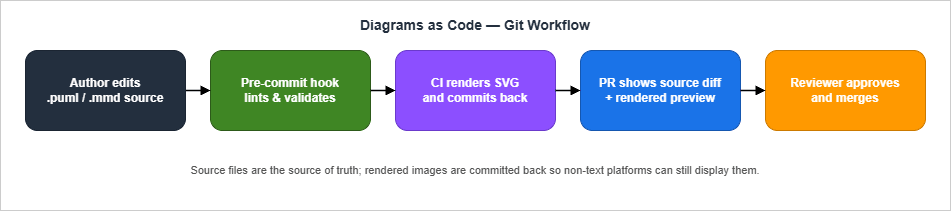
diagrams/ directory:service-catalogue/
├── src/
├── docs/
│ └── architecture.md
└── diagrams/
├── context.puml
├── containers.puml
├── place-order.sequence.puml
└── rendered/
├── context.svg
└── containers.svg
The source files (
.puml, .mmd, .dsl) are the source of truth. The rendered/ subdirectory contains the latest committed images so that platforms without a text renderer (Confluence, the GitHub UI for non-Mermaid notations, internal CMSs) can still display the diagram. The committed images are regenerated by CI on every change to a source file, so the rendered version cannot drift more than one commit out of date.Pre-commit hook. A pre-commit hook runs the same renderer locally and fails the commit if the rendered image is missing or stale. For Mermaid,
mmdc (the Mermaid CLI) handles this. For PlantUML, plantuml -checkonly validates the source without rendering and is fast enough to run in pre-commit; the actual render runs in CI.CI rendering. A GitHub Actions step (or equivalent) iterates over
diagrams/*.puml and diagrams/*.mmd, regenerates the SVGs, and commits them back if changed. For PlantUML, the official plantuml/plantuml Docker image keeps the Java + Graphviz dependency out of every developer's machine. For Mermaid, the node:lts-alpine image with @mermaid-js/mermaid-cli is sufficient.PR preview. The diff of a diagram source is plain text, but reviewers want to see the rendered output. A bot (or a CI job that uses the GitHub API) attaches the new SVG to the PR description as an image, side-by-side with the previous version. This gives the reviewer the same affordance they have for a code diff: change visible, in the PR, with line-level commentable text below.
Branching strategy. Diagrams change less often than code, so they should not block code merges. A PR that updates a diagram alongside a code change is normal; a PR that only updates a diagram is also normal and should be reviewable in minutes.
Common Pitfalls
After enough projects, the same problems recur. The list below is the short version of what costs me time when I rejoin a codebase that already uses one of these notations.- Letting the rendered image become the source of truth. Once one developer hand-edits a checked-in
.svgbecause "it was faster", the source.pumland the image diverge silently. Catch this with a CI job that re-renders and compares; fail the build on diff. - Mermaid syntax that works in
mermaid.livebut not on GitHub. The GitHub renderer ships its own bundled Mermaid version that lags the latest release. Lock to the GitHub-supported subset (or set up a CI check that renders against the same version). - Special characters in node labels. Mermaid's flowchart parser treats
(,[,{,<,>as syntax. Wrap labels in double quotes or HTML-encode the special characters, otherwise the renderer fails silently or produces garbage. - Newlines in PlantUML labels. PlantUML uses
\nfor line breaks in labels but\\nwhen the label is inside a stereotype guillemet. Mermaid uses<br/>. Mixing the two when porting a diagram is the most common rendering bug I see. - Subgraphs that swallow each other. Mermaid's
subgraphnesting works, but layout quality drops sharply past two levels. If your C4 Container diagram has more than two nested boundaries, switch to PlantUML for that one diagram. - "All four C4 levels" as a goal. The Code level should not be hand-maintained. Generate it from the source code, or skip it. Teams that try to keep four hand-drawn levels in sync abandon the practice within a quarter.
- One huge diagram that tries to show everything. If you are at twenty boxes on one page, you have lost the abstraction. Split into two diagrams at different levels, or one Container view plus one Sequence view, before you reach for a wider canvas.
- External include URLs that point to
master. The C4-PlantUML!includedirective in many examples points atmaster; that branch is moving. Pin to a release tag (!include https://.../v2.10.0/C4_Container.puml) so the diagram does not silently change when upstream renames a macro.
None of these pitfalls is fatal, but each costs one debugging session. The rule of thumb that avoids most of them is to render diagrams in CI against the same renderer your readers will use, and to fail builds on render errors so the problem is caught before merge.
What Diagrams Should and Should Not Capture
Tooling and notation are downstream of a more important question: what belongs in a diagram in the first place. The cost of a bad diagram is not the rendering effort; it is the months engineers spend repeating misunderstandings that the diagram could have prevented or, worse, the months they spend believing a diagram that no longer matches the system. Three principles cut most of those costs:A diagram should answer a single specific question. "How does the order-placement flow work" is a question; "the architecture" is not. The first produces a Sequence diagram with a clear start and end and a finite cast; the second produces an everything-everywhere-all-at-once box dump that no one revisits. Before drawing, write the question down in the diagram's caption. If the caption is generic, redraw — you are about to spend an hour on something that will not earn its keep.
A diagram should be at one abstraction level only. The C4 model exists to enforce this; even outside C4, the rule holds. Mixing a deployment view with an internal call graph in the same picture is the most common abstraction-mixing mistake, and it produces a diagram that confuses both audiences — the operations reader is looking for AZs and subnets, the developer reader is looking for service boundaries, and neither sees what they need. Two diagrams beat one merged diagram in almost every case where you are tempted to combine them.
A diagram should age out gracefully. Architectural drawings have a shelf life, and pretending they do not is how teams end up with a proudly maintained binder of false maps. A diagram that is hand-maintained at the Code level will be wrong within a sprint; a Container-level diagram updated quarterly stays useful for a year; a System Context diagram updated yearly stays useful for several years. Match the maintenance cadence to the abstraction level, and accept that the lower levels are better generated from code than drawn by hand.
The corollary worth stating out loud: not everything that can be diagrammed should be diagrammed. A README paragraph that says "the order service publishes events to EventBridge, and the inventory and notification services consume them" is sometimes the right answer, even if a Mermaid diagram could show the same thing. Prose ages better, takes less time to author, and forces the writer to commit to one specific framing rather than letting a reader project their own meaning onto an ambiguous diagram. Diagrams excel at showing topology and flow; they are weak at conveying "why" or "what changed." Use both, and use prose first when the question is not fundamentally a topology question.
A practical heuristic that sharpens this: imagine a new engineer joining the team six months from now, opening a single document to learn the system. If a diagram would shorten that engineer's onboarding by an hour, draw it. If a diagram would just decorate a section that prose already covers, skip it. The bar for adding a diagram is "does it answer a question prose cannot answer concisely," not "does this section feel under-illustrated." The discipline of saying no to diagrams that fail this test is the difference between architecture documentation that compounds in value and a wiki garden that grows in surface area without growing in usefulness. The same discipline applied to existing documentation usually shortens it: most architecture wikis I have inherited have one or two diagrams worth keeping and a half-dozen that can be deleted in favour of a paragraph each, and the deletion improves rather than degrades the document.
Summary
Text-based diagram notations have replaced GUI tools for diagrams that travel with the code, because they survive the review, version-control, and AI-assisted-authoring workflows that GUI exports cannot.Among the three notations covered here, the choice collapses to three rules. If the diagram needs to render on GitHub, Notion, or any browser-native Markdown surface, use Mermaid — its zero-setup rendering is in a different category of friction from PlantUML's. If the diagram needs strict C4 vocabulary and a CI pipeline can run a renderer, use C4-PlantUML — the macro coverage is mature and the Graphviz layout scales further than Mermaid's. If the diagram is a long-lived multi-team reference architecture, use Structurizr DSL — only it cleanly separates the model from the views, which is what lets a single source of truth produce five diagrams without drift.
Notation aside, the discipline that determines whether the diagrams pay off is independent of the tool: pick one abstraction level per diagram, match the maintenance cadence to that level, and prefer prose when the question is not fundamentally a topology question. The right notation only matters once those choices are right.
Related Resources
This section gathers the official sites for the three notations, the macro libraries, and the in-site tools that pair with this article.- C4 model — official site (Simon Brown). Definitions of the four levels, abstraction guidance, FAQ.
- Structurizr. Reference implementation of the C4 model; DSL plus rendering CLI.
- C4-PlantUML. MIT-licensed macro library that adds the C4 vocabulary to PlantUML.
- PlantUML — official site. Catalog of supported diagram types, language reference, server setup.
- Mermaid — official site. Live demos for every diagram type, syntax reference.
- "Include diagrams in your Markdown files with Mermaid" — GitHub blog (2022-02-14). Original announcement of native Mermaid rendering on github.com.
- Kroki. Unified rendering server that handles PlantUML, Mermaid, GraphViz, BlockDiag, and many more notations behind one HTTP endpoint.
- Mermaid Diagram Live Editor (in-site tool). Browser-side Mermaid editor and SVG/PNG exporter for prototyping before committing.
- Architecture Decision Records — Templates and Operational Patterns (related article). The companion piece on capturing the rationale behind diagrams: when to record an ADR, how to embed C4/PlantUML/Mermaid sources alongside it, and how diagrams and ADRs evolve together as architecture changes.
References:
C4 model
PlantUML
Mermaid
C4-PlantUML
Structurizr
Include diagrams in your Markdown files with Mermaid (GitHub Blog)
Mermaid Diagram Live Editor — hidekazu-konishi.com
References:
Tech Blog with curated related content
Written by Hidekazu Konishi