Express Mode and Pre-Deployment Validation in AWS CloudFormation - What Completion Stopped Meaning, What Rollback Now Defaults To, and Which Checks Silently Skip
First Published:
Last Updated:
As of June 30, 2026, this interpretation is no longer universally valid, thanks to the introduction of AWS CloudFormation's express mode. On the same day, pre-deployment validation also became a default feature for all stack operations. The former alters the meaning of completion, while the latter changes the timing of failure detection. Both of these changes take effect without requiring modifications to existing templates.
This article focuses on these two features, not as individual functionalities, but as changes to the meaning of completion. The intended audience includes those who use CloudFormation or AWS CDK to build deployment pipelines and who rely on stack completion as a trigger for subsequent jobs. If a downstream job has ever failed on you right after a reported completion, the reason for that is this article's subject.
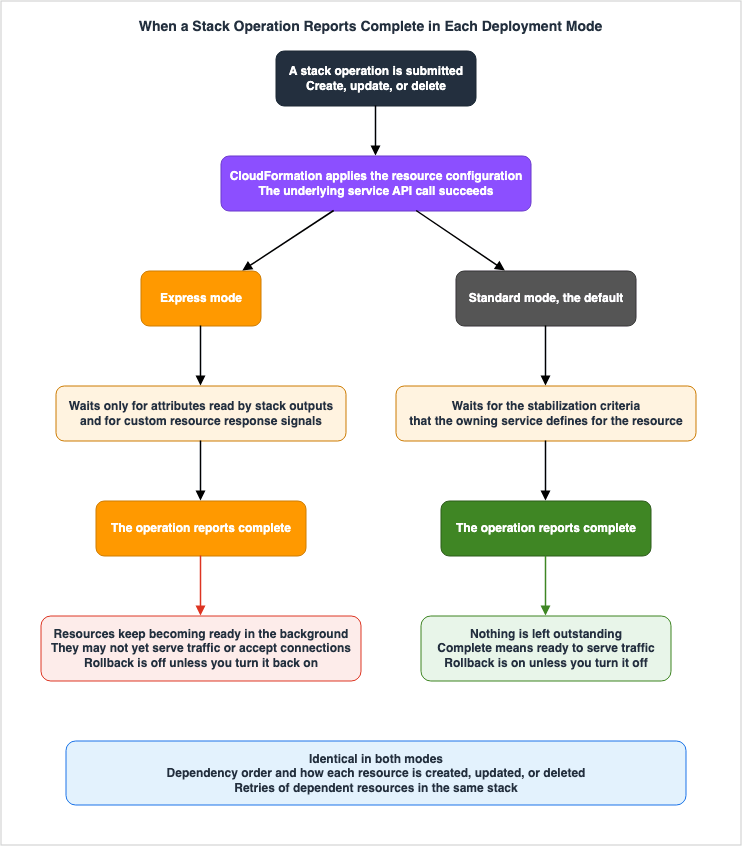
The core conclusion, stated up front: the decision express mode really demands is not about speed. It is about finding where in your pipeline completion is read as a signal of resource availability. And what gets skipped is stabilization alone, not dependency order. Failing to recognize this distinction can lead to the misconception that express mode is a dangerous mode that ignores dependencies. Dependency order, the way each resource is operated on, and retries inside the same stack are all unchanged.
One more key point to address upfront: express mode disables rollback by default. While often presented as a speed optimization, this setting ultimately determines what remains after a failure. You can win speed back; a half-finished stack you clean up by hand.
Pre-deployment validation also presents a similar potential pitfall. Validation results that are treated as warnings are delivered as failure events. And a validation that needs a read permission the caller lacks is skipped without a word. Validation being on by default and validation having actually run are two separate things.
Every specification in this article was checked against official AWS documentation on August 19, 2026. That process turned up nine discrepancies inside AWS's own documentation. One of these involved three official documents providing differing guidance on whether or not the feature can be used in a production environment. Chapter 9 collects every one of them with its source, and states with reasons which side this article treats as authoritative.
The division of labor with the existing articles is worth stating up front too. This article covers only the definition of completion and the guarantees that get dropped; it does not cover how to choose a tool. IaC tool comparison and the mental models underneath it belong to Comparing Terraform, AWS CDK, AWS SAM, and CloudFormation. StackSets operations belong to Summary of AWS CloudFormation StackSets, and implementing custom resources belongs to Deploy AWS Cloudformation Stack Cross-Region with AWS Lambda Custom Resources. This article will only briefly reference these resources at points where the meaning of "completion" changes.
Table of Contents
- 1. What the Word "Completion" Signified
- 2. What Express Mode Skips and What It Keeps
- 3. Rollback Is No Longer the Default
- 4. What Express Mode Still Waits For
- 5. Where Downstream Assumptions Break
- 6. Pre-Deployment Validation Became the Default on Every Operation
- 7. A Warning That Arrives as a Failure
- 8. The Validation That Never Ran
- 9. Where the Primary Sources Contradict Each Other
- 10. Drawing the Line Between Where to Use It and Where Not To
- 11. Putting Both Into a Pipeline
- 12. Failure Modes and Anti-Patterns
- 13. Design Checklist
- 14. Frequently Asked Questions
- 15. Summary
- 16. References
1. What the Word "Completion" Signified
1.1 The Gap Between Created and Usable
When you add anAWS::SQS::Queue to your template and deploy, the queue is created. It cannot necessarily receive a message at that moment. A gap sits between created and able to handle traffic. This gap exists across various AWS services. An EC2 instance launches before it can answer an HTTP request. A CloudFront distribution exists before it reaches edge locations worldwide. An ECS service goes active before its containers pass health checks and reach the desired count. Deleting a Lambda function does not finish until its network interfaces are cleaned up.Stabilization is the step that closes this gap. After creating each resource, CloudFormation keeps checking it against the criteria the owning service defines for that resource type. Miss those criteria before the timeout and the resource counts as failed. CloudFormation does not set the criteria or the timeouts uniformly; the service that owns the resource type defines both.
Therefore, when a stack operation is considered complete under standard behavior, it carries two things: the configuration has been applied, and that configuration has reached a state where it works. Because those two were bundled into the single word complete, a design that triggers downstream work on completion held together.
1.2 The Observation Point Added in 2024
Designs that wait for stabilization are safe, but slow. To address that delay, AWS added an observation point in 2024:CONFIGURATION_COMPLETE.The user guide describes events that occur during stack creation in four stages. When resource creation begins, the status is set to
CREATE_IN_PROGRESS. Next the eventual consistency check runs. At the point where the configuration has finished and that check is in progress, a detailed status of CONFIGURATION_COMPLETE is set. When the check finishes and the resource matches the template, the status is set to CREATE_COMPLETE.The user guide's description of when this event occurs is inconsistent with other sections on the same page (Section 9.3). The order described above follows the sequence of events listed on the same page, the AWS SDK reference, and descriptions in the 2024 AWS DevOps Blog.
Two points matter here.
CONFIGURATION_COMPLETE is a detailed status, not a status itself, and the stack operation does not end at that moment. The value is set both at the resource level and at the stack level, which let users decide for themselves when to stop waiting. However, the stack operation continues, eventually reaching CREATE_COMPLETE. Therefore, what was added in 2024 was an option to stop waiting, not a change to the definition of completion.This observation point comes with two constraints. The first is a limit on scope, which the user guide states directly.
First, it's only supported for a subset of resource type that support drift detection.The second limitation is that this event may not always occur.
Because the CONFIGURATION_COMPLETE event is not guaranteed to be set, any scenarios that
use it should be prepared to handle a CREATE_COMPLETE event when no CONFIGURATION_COMPLETE
event was set.
A design that waits on a signal which may never arrive has to wait for
CREATE_COMPLETE as well, for the case where it does not. In practice, this results in a state machine that needs to monitor both. That complexity is one reason CONFIGURATION_COMPLETE never came into wide use.1.3 What Changed in 2026: The Definition
June 30, 2026, marked a change with the introduction of express mode. Instead of observing and then ignoring, the stack operation itself concludes at the point when the configuration is applied. The user guide explains:With CloudFormation express mode, you can complete stack operations as soon as CloudFormation
applies the resource configuration, without waiting for resources to fully stabilize.From the user's side, what changes is the moment the API returns. CloudFormation declares completion instead of leaving the user to decide when to stop waiting. Nothing limits the scope either. Express mode works with all existing templates and does not require any template modifications.
Listing these three completion points clearly illustrates the direction of the change:
| At what point | How it appears | Scope | Does the stack operation end |
|---|---|---|---|
| Configuration application is complete, and stabilization is ongoing | CONFIGURATION_COMPLETE (detailed status) | A subset of resource types that support drift detection. May not always be present. | No |
| Configuration application is complete | Express mode completion | All templates | Yes |
| Stabilization is complete | CREATE_COMPLETE (status) | All templates | Yes |
The second and third rows of that table now go by the same word. Both are the completion of an operation. What separates them is only what is guaranteed at the moment it arrives.
2. What Express Mode Skips and What It Keeps
2.1 What Is Skipped Is the Wait for Stabilization
The user guide's own wording defines how express mode behaves.In express mode, CloudFormation typically considers a resource operation complete as soon as
the API call to create, update, or delete the resource succeeds. In most cases, CloudFormation
does not wait for the resource to reach its final operational state.The words
typically and In most cases are worth reading carefully. The primary source is saying that exceptions exist. Chapter 4 covers them.The user guide sets out what that omission leaves behind at the moment of completion, in three parts. First, the resource may still be initializing or propagating changes. Second, it may not yet be able to receive traffic or connections. And third, a deletion operation may still be in progress. The third gets overlooked. Deletion is an express mode operation too, and a report that a deletion finished does not mean the resource is gone.
2.2 Dependency Order Is Not Skipped
This is the distinction this article most wants to hold on to. The user guide states it in a single sentence.Express mode does not change the dependency ordering of your resources. It changes when
the stack operation reports complete.Specifically, when a resource references the ID or attributes of another resource using
Ref or Fn::GetAtt, CloudFormation confirms that the referenced resource's configuration has been applied before it starts on the referencing resource. Resources with no dependency between them still proceed in parallel.Furthermore, if a referencing resource experiences a transient failure due to the referenced resource not yet being ready, CloudFormation will automatically retry the operation. This retry process does not require user intervention. The AWS News Blog describes this as a built-in resilience that absorbs timing issues that can occur during the stabilization process of resources. Both the AWS News Blog and What's New limit this retry to within the same stack. The sources disagree on that scope, which Section 9.2 takes up.
Therefore, it is incorrect to understand express mode as a way to ignore dependencies. What moved is the criterion for confirming a dependency: from stabilization finishing to configuration being applied. This difference becomes relevant only when a resource depends on the operation of another resource, but that dependency is not written as a template reference.
2.3 A Completed Resource Carries a Status Reason
A resource that completes in express mode has that fact recorded as its status reason. The AWS DevOps Blog explicitly mentions this string.Resource operation completed using express mode. It may continue becoming available in the background.That string earns its keep in operations. Read the events of a completed stack and you can tell which resources finished on configuration alone and which are still stabilizing. That is the handle for the readiness layer in Section 11.3.
2.4 Propagation to Nested Stacks
Enable express mode on a parent stack and the setting propagates to every nested stack in the hierarchy. You do not set it on each nested stack. Every resource in the root stack and below it completes at the moment its configuration is applied.Propagating is also a way of reaching further than you meant to. Even if you only intend to accelerate resources directly beneath the parent stack, those in deeper, production-critical nested stacks will be treated the same way. When you try this mode on a deeply nested configuration, start from the assumption that the whole hierarchy is in scope.
3. Rollback Is No Longer the Default
3.1 What the Primary Source Says
This section forms the core of this article. The user guide states:When you use express mode, CloudFormation disables rollback by default. If a resource
operation fails, CloudFormation does not automatically roll back the changes.The AWS News Blog also makes the same point, providing an explanation of the intention. Rollback is disabled by default to allow users to quickly correct issues and retry deployments without waiting for the rollback operation to complete. During development, fixing the failure in place and moving on is the faster path.
This default setting prioritizes iteration, not speed. Users who specifically chose express mode for the sake of speed may unknowingly deploy with rollback disabled.
3.2 The Default Is Written Two Different Ways
It's important to read this section carefully. While--deployment-config is visible from the CLI or console, in the API it's a DeploymentConfig structure with two members: Mode and DisableRollback.| Member | Possible values | Default in the SDK reference |
|---|---|---|
Mode | STANDARD or EXPRESS | STANDARD. No explicit specification is required. |
DisableRollback | Boolean | false |
The default of the
DisableRollback member of the structure is false. However, the user guide states that when using express mode, rollback is disabled by default. These two statements appear contradictory.The reading that makes both true is this. The SDK reference gives the default of the field, meaning how the structure reads when you supply no value. The user guide gives the effective default once the mode is EXPRESS. No source states that resolution outright; it is this article's inference from the two statements. Take the SDK reference alone, assume rollback still runs in express mode, and the discrepancy surfaces the first time something fails.
The practical implication is simple: if you use express mode, write
disableRollback explicitly. Choosing not to do so is essentially betting on which of the two documents is correct.One more thing is worth holding on to: two parameters share the same name.
DisableRollback exists both as a member of DeploymentConfig and as a parameter of the stack operation itself. The latter is a legacy parameter that predates express mode. The API reference describes it as a setting that disables rollback if stack creation fails, and it cannot be used in conjunction with OnFailure, with a default value of false. In the AWS Tools for PowerShell New-CFNStack syntax, these two are listed as separate parameters: -DisableRollback and -DeploymentConfig_DisableRollback.None of the documentation reviewed here states which of the two wins when both are supplied. Using only one of them is the safer course.
3.3 Reverting Rollback Settings
On the CLI you pass both through--deployment-config.aws cloudformation create-stack --stack-name my-stack \
--template-body file://my-template.yaml \
--deployment-config '{"mode": "EXPRESS", "disableRollback": false}'AWS CDK uses a different flag. The CDK CLI reference states that to enable automatic rollback in express mode, you should include the
--rollback flag.cdk deploy --express --rollbackIn the AWS SAM CLI, the
--disable-rollback flag, used in conjunction with --express, controls the rollback behavior within the deployment configuration.The way these settings are specified varies across the three tools. Because the tools use different names and polarities for JSON keys, CLI flags, and CDK flags, put the conversion in one place when a pipeline spans more than one tool. In particular,
disableRollback: false and --rollback express the same concept using opposite terminology.3.4 What Remains After a Failure
When a deployment fails with rollbacks disabled, any resources created up to that point will remain in place. The CDK CLI reference documentation states that stacks will remain in a failed state.However, this behavior isn't always guaranteed. The user guide notes that disabling rollback isn't supported for immutable update operations. If an update requires replacing a resource and that operation fails, the failed state cannot be preserved for retry. If you plan to operate based on a failed state, first verify whether the update involves resource replacement.
This can be an advantage during development. If a deployment fails, you can correct the problematic section and then proceed with the next deployment, resuming from where it left off. There's no need to wait for the rollback to complete, nor is there any need to recreate resources.
The issue arises when this state is created unintentionally. For example, a script intended for development might run on a production account, or the deployment might propagate to unexpected layers of nested stacks. Because the remaining resources are under CloudFormation's management, manually deleting them can disrupt the stack's consistency. The next steps to take depend entirely on the stack's current status.
3.5 The CDK Documentation Puts It More Strongly
Regarding the same topic of rollbacks, the CDK CLI reference states:Express mode does not wait for stabilization before reporting success and does not perform
automatic rollback upon failure. We do not recommend express mode for production
deployments. Express mode is targeted towards iterative deployments you would perform
while developing your application.This statement appears not only in the documentation for
cdk deploy but also for cdk destroy. In the cdk destroy section, it explicitly discourages using it for removing production stacks. While cdk bootstrap includes the --express option, it lacks the same discouraging language.For the same feature, the CloudFormation user guide and the CDK CLI reference speak with different force. Chapter 9 takes that discrepancy up in full.
4. What Express Mode Still Waits For
The sentence quoted from the primary source in Chapter 2 containedtypically and In most cases. This chapter lists those exceptions. This chapter is usually the answer when someone asks why express mode did not make anything faster.4.1 Attributes Read from Stack Output
This first exception appears as a note on the troubleshooting page.If a resource attribute is referenced in a stack output, CloudFormation waits for the
resource to propagate so that it can read the attribute value, even in express mode.Reading an attribute requires the propagation to have happened, so CloudFormation waits. That wait cannot be dropped. For every resource whose attribute sits in an output, the wait that express mode can skip shrinks.
Two things follow. Cutting outputs raises what express mode buys you. And for an attribute you did put in an output, the value is readable at the moment of completion. That second one is usable in a design: if a downstream job needs a value that sits in an output, the old assumption still holds for that value.
However, it is important to remember that being able to read an attribute does not guarantee that the corresponding resource is available. Even if you can read the DNS name of a load balancer, it does not necessarily mean you can send traffic to it. What is guaranteed is the ability to read the attribute value, not the availability of the resource.
4.2 Custom Resources
The user guide mentions custom resources in the section outlining unsupported features and limitations.Custom resources (including AWS::CloudFormation::CustomResource and Custom::* resources)
follow their default behavior. CloudFormation waits for the custom resource to send a
response signal before considering the operation complete, even in express mode.The reason is structural. The implementer of a custom resource, not AWS, defines its stabilization criteria. The code that sends the response signal belongs to the implementer, and CloudFormation has no way to skip it. A custom resource is a resource whose implementer defines its own stabilization. Details on implementation are covered in Deploy AWS Cloudformation Stack Cross-Region with AWS Lambda Custom Resources.
The user guide recommends setting a maximum wait time with the
ServiceTimeout property so that a slow or stuck custom resource does not hold up a fast iteration workflow. In stacks containing a large number of custom resources, the effectiveness of express mode is determined by the ServiceTimeout configuration.4.3 Express Mode Cannot Be Used with StackSets
The user guide explicitly lists StackSets as an unsupported feature.CloudFormation does not support express mode with StackSets operations.Express mode is therefore no help on the path that distributes stacks across multiple accounts and multiple Regions. StackSets operations themselves belong to Summary of AWS CloudFormation StackSets.
4.4 Summary
| Item | How express mode treats it | Source |
|---|---|---|
| An ordinary resource | Completes when the configuration is applied | The express mode chapter of the user guide |
| A resource whose attribute is read by a stack output | Waits for propagation | The note on the troubleshooting page |
| A custom resource | Waits for the response signal | The unsupported features and limitations section |
| A StackSets operation | Cannot be used | The same section |
This table sets the ceiling on how fast express mode can be. A stack with many outputs and many custom resources will not deliver the gain you expect.
5. Where Downstream Assumptions Break
5.1 Designs That Were Waiting for Propagation
CloudFormation troubleshooting documentation lists three potential issues that can arise in express mode. The first is that resources may not yet be fully available. If your application assumes complete resource availability immediately after deployment – for example, that an EC2 instance is passing health checks or that a CloudFront distribution is fully deployed globally – those assumptions may prove incorrect.The user guide provides four examples illustrating the readiness status of different resource types. The primary source itself calls the table illustrative rather than complete, so you cannot assume that resource types not listed are inherently safe.
| Resource type | Operation | Readiness behavior after completion |
|---|---|---|
| Amazon CloudFront distribution | Create/Update | Global deployment can take several minutes. |
| Amazon EC2 instance | Create | User data scripts and status checks can still be running. |
| AWS Lambda function | Delete | Resource cleanup can still be running. |
| Amazon ECS service | Create/Update | Tasks can still be starting and reaching a steady state. |
When examining your own pipeline, do not go hunting for these four cases. List what your pipeline assumes to be true the instant completion arrives. If your smoke tests are hitting endpoints, that assumes availability. If traffic switching is driven by completion, that also assumes availability.
5.2 Name Conflicts After a Deletion
The second concerns deletion.After a stack delete completes in express mode, some resources might not yet be fully
removed. If you immediately try to create a new stack with the same resource names, you
might encounter name conflicts.This is the easiest one to hit during development. The iterative process of deleting and recreating is frequent in development environments. Moreover, conflicts are more likely to occur with resources that have fixed names. For example, a developer might use express mode to speed up deletion and iteration, only to have the subsequent creation fail due to a name collision.
The pre-deployment validation covered in the next chapter is exactly what detects such a name conflict. A scenario can arise where pre-deployment validation picks up an old name after a deletion has completed in express mode, essentially treating it as if it still exists. Although both features were released on the same day, the original documentation does not address this interaction.
5.3 Failure of Dependent Resources
The third concerns dependencies. The troubleshooting page notes that because express mode does not wait for resources to stabilize, downstream resources that rely on upstream resources being fully operational may fail. In such cases, it recommends considering using the default mode for that stack.As Chapter 2 described, CloudFormation retries transient failures inside the same stack. A retry absorbs a transient failure; it does not fill in a dependency that is simply missing. Where a resource depends on another that takes minutes to become fully operational, and no template reference expresses that dependency, the retries run out and the operation fails.
5.4 When the Dependency Crosses Stacks
Where several stacks run in sequence, each stack takes in the output of the one before it. As previously stated in Section 4.1, the attributes present in the output are accessible in express mode.The AWS documents, though, disagree on whether that retry safety net reaches across stacks. What's New and the AWS News Blog both limit it to within the same stack, the user guide gives no scope at all, and the AWS DevOps Blog says it covers dependencies that cross stacks through import and export. Section 9.2 sets the four side by side. Design against the narrower reading.
5.5 A Single Distinction That Reveals Everything
The way things have been breaking down so far can be reduced to a single question for each element that operates upon completion: Does it require the resource to be usable, or does it only require the resource to exist and have its attributes accessible?Elements belonging to the latter category will function as is, even in express mode. Actions such as passing values to the next stack, generating documents, or adding tags do not directly interact with the resource itself. Only elements requiring the former need a separate waiting layer.
Section 10.3 expands this distinction into three questions that should be answered before selecting a mode.
6. Pre-Deployment Validation Became the Default on Every Operation
6.1 What Changed
Pre-deployment validation itself has been around since November 18, 2025. At that point it ran only when a change set was created, and it covered three things: property syntax errors, resource name conflicts, and whether an S3 bucket was empty.On June 30, 2026, two changes occurred simultaneously. The same validations began running on
CreateStack and UpdateStack as well, and three more warning-mode validations were added that run only when a change set is created. That brought the number of validation types to six. The user guide states:Pre-deployment validation runs automatically on Create Stack, Update Stack, and Create
Change Set operations, catching common errors in seconds.The same page also clearly outlines the expected standards.
Pre-deployment validation focuses on common deployment failure scenarios. It doesn't
guarantee that your deployment will succeed, but reduces the likelihood of common failures.
The primary source states plainly that it does not guarantee success. Treating a passing validation as the acceptance criterion for a deployment runs straight into that caveat.
6.2 The Six Validations and Where Each One Runs
| Validation type | Mode | Runs on |
|---|---|---|
| Property syntax validation | FAIL | CreateStack, UpdateStack, CreateChangeSet |
| Resource name conflict detection | FAIL | CreateStack, UpdateStack, CreateChangeSet |
| S3 bucket emptiness validation | WARN | CreateChangeSet |
| Service quota validation | WARN | CreateChangeSet |
| Config Recorder conflict detection | WARN | CreateChangeSet |
| ECR repository delete readiness | WARN | CreateChangeSet |
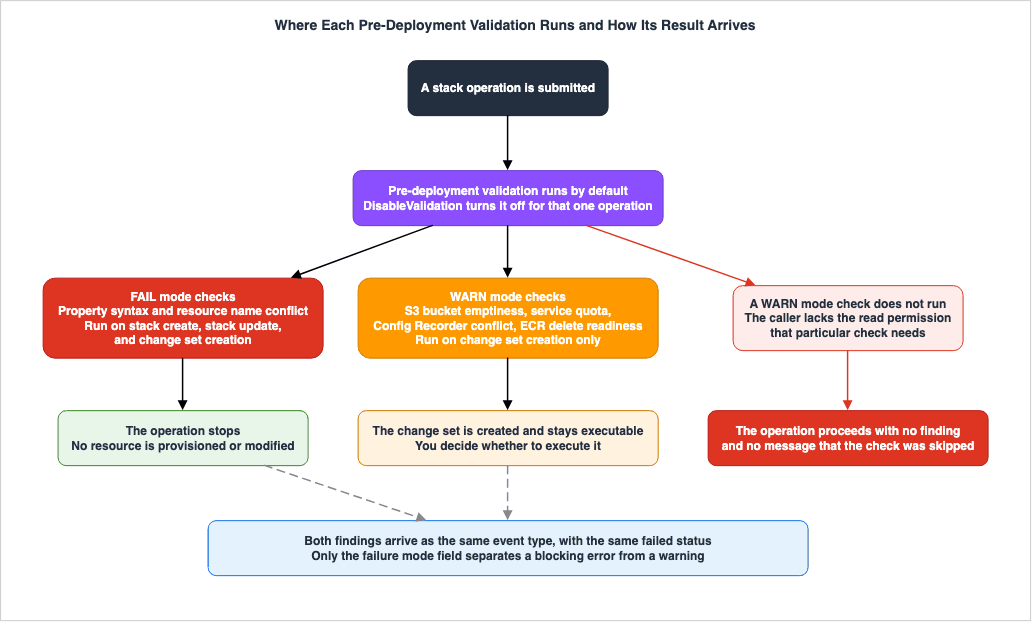
Put in words: the two FAIL-mode validations run on every operation, and the four WARN-mode validations run only when a change set is created.
Here is what each one looks at. The property syntax validation compares resource properties against the AWS resource schema, verifying the presence of required properties, the validity of values, and checking for unsupported or deprecated property combinations. The resource name conflict detection checks whether a name the template specifies already exists in the account. The S3 bucket emptiness validation warns when a bucket that still holds objects is about to be deleted, and reports the object count. The service quota validation checks whether creating a resource would exceed the account's quota. The Config Recorder conflict detection warns when the template adds Config rules to an account that does not have Config recording enabled, or defines a Config Recorder in an account where one is already active. The ECR repository delete readiness check verifies whether the repository targeted for deletion is empty or has an appropriate force-delete setting.
The S3 validation carries a limit on its scope.
S3 bucket validation only checks for object presence, not for bucket policies or other
constraints that might prevent deletion.
The absence of a warning indicating that the bucket is empty does not mean that it can be deleted. If a bucket policy blocks the deletion, this validation passes straight over it.
6.3 Interpreting the Results
The validation results are retrieved on a per-operation basis.CreateStack now returns an OperationId in its response, and the user guide tells you to use that operation ID with the describe-events command to read the validation results of CreateStack and UpdateStack. However, the example provided on the same page demonstrates using the stack name instead of the operation ID.aws cloudformation describe-events \
--stack-name MyStackDescribeEvents requires exactly one of ChangeSetName, OperationId, or StackName as input, so either call works. The difference is how narrowly you filter. When calling with the stack name, the command returns events associated with that stack, grouped by operation ID. When calling with the operation ID, it returns only the events for that specific operation. From automation, use the operation ID the previous response returned; nothing from another operation can then slip in.Four kinds of events come back: progress events, validation errors, provisioning errors, and hook invocation errors.
Validation error events contain the following fields:
| Field | What it holds |
|---|---|
EventType | VALIDATION_ERROR |
ValidationName | PROPERTY_VALIDATION, NAME_CONFLICT_VALIDATION, SERVICE_QUOTA_VALIDATION, etc. |
ValidationFailureMode | FAIL or WARN |
ValidationStatus | FAILED |
ValidationStatusReason | Description of the issue |
ValidationPath | Position in the template |
LogicalResourceId | Logical ID |
The
ValidationPath field is particularly useful. It returns the position in the template as a slash-separated path, which saves hunting for the resource and the property by hand.6.4 Why to Route Through Change Sets
The constraint that the four WARN-mode checks run only at change set creation has a design consequence. On a path that callscreate-stack directly, quota overruns, Config Recorder conflicts, and ECR delete readiness are never checked. The user guide says the same thing from the change set side.Change sets also surface WARN-mode validations that are not available on direct stack
operations.The AWS DevOps Blog recommends placing change set creation as the first stage in your pipeline. In a pipeline that already uses change sets, that makes pre-deployment validation fire at the entrance.
AWS CDK includes a command called
cdk validate. According to the same AWS DevOps Blog article, the command synthesizes your CDK app, creates a change set to invoke the server-side pre-deployment validation, collects the results through DescribeEvents, and produces a report with construct-level source tracing. The value of this command lies in its ability to return errors to specific lines of CDK code, rather than just CloudFormation logical IDs.That implementation detail matters for coverage, not just plumbing. Because
cdk validate goes through the change set path, it receives all six validations.6.5 How Much Time Validation Adds
The user guide is explicit about the added latency.Pre-deployment validation adds a small amount of latency to Create Stack and Update Stack
operations while validations run. This is typically a few seconds.According to the AWS DevOps Blog, these few seconds can be worthwhile, as they prevent the need for lengthy creation and rollback processes that can take several minutes.
6.6 Some Resource Types Are Not Covered
The user guide lists the resource types that pre-deployment validation does not support. There are several hundred of them. Keeping that list in the article means it goes stale on the next addition or removal. What you need for a decision is not the list itself but two points.First, for unsupported resource types, errors related to property syntax will not be detected. Second, these unsupported types often include resources used on a daily basis. Examples include:
AWS::IAM::Role, AWS::IAM::User, AWS::IAM::Group, AWS::IAM::Policy, AWS::EC2::SecurityGroup, AWS::S3::BucketPolicy, AWS::SNS::Topic, AWS::RDS::DBInstance, AWS::ECS::Service, AWS::EKS::Cluster, and AWS::CloudFormation::Stack. AWS::CloudFormation::Stack, the type that represents a nested stack, is on that list, which is worth remembering.The meaning of this list is not definitively established in its current form. While
AWS::ECR::Repository and AWS::Config::ConfigurationRecorder are also included, those two are exactly the resources the WARN-mode validations on the same page target. The wording above takes the reading that the list applies only to the property syntax validation, and that reading is this article's inference. Section 9.4 gives the reasoning, and what the other reading would imply.For your own templates, read the relevant section of the user guide rather than the list in this article. This list is subject to change.
7. A Warning That Arrives as a Failure
7.1 Understanding the Two Modes
The user guide explains the difference between the two modes as follows: In FAIL mode, if validation detects an error, the operation is stopped before any resources are created. WithCreateStack and UpdateStack, the operation fails, and the stack status reflects the validation failure. With CreateChangeSet, the change set status will become FAILED.In WARN mode:
WARN mode allows change set creation to succeed despite validation failures, providing
warnings that developers can review and address before execution.
A problem found by a WARN-mode validation still leaves the change set created and executable. The decision is handed to you. Constraints that a person can clear by hand, such as objects still sitting in an S3 bucket, fall into this category.
7.2 One Field Is the Only Discriminator
This is where implementations trip. A WARN-mode validation result arrives in the same event type as a FAIL-mode one. Examining the output shown in the AWS DevOps Blog as an example of service quota warnings reveals thatEventType is VALIDATION_ERROR, ValidationStatus is FAILED, and the only difference is that ValidationFailureMode is WARN.The only output the AWS DevOps Blog shows is for the service quota validation. It does say that the other two newly added warning validations, Config Recorder conflict detection and ECR repository delete readiness, follow the same pattern, and it says nothing on this point about the S3 bucket emptiness validation. The table below combines what the blog says about those three with the WARN classification in the user guide.
| Field | FAIL-mode validation | WARN-mode validation |
|---|---|---|
EventType | VALIDATION_ERROR | VALIDATION_ERROR |
ValidationStatus | FAILED | FAILED |
ValidationFailureMode | FAIL | WARN |
| What happens to the operation | It stops | It continues |
Not the event type and not the status: only the failure mode field separates the two. Getting this wrong breaks things in two directions.
The first is that a pipeline branching on
EventType or ValidationStatus treats a warning as a failure. An executable change set exists, and the pipeline stops anyway. Because the WARN validations do not run on a path that calls create-stack directly, only the change set path stops.The second breaks the other way. A pipeline that moves on once the change set is created never reads the warning events at all. The quota warning, the Config Recorder conflict, and the images still sitting in ECR all get carried through to execution time. The AWS DevOps Blog notes that WARN-mode validations point at problems that can fail at execution time, and recommends addressing them ahead of that.
7.3 How to Handle a Warning in a Pipeline
Branch onValidationFailureMode. Then settle, as a pipeline policy, what happens to a warning. The choices are to ignore it, show it to a person, or stop, and not choosing is the second failure above. Which warnings matter for your workload depends on what the template deletes. A change set that deletes things surfaces the S3 and ECR warnings; a change set that creates a great deal surfaces the quota warning.8. The Validation That Never Ran
8.1 Missing Permissions Make a Check Disappear
Pre-deployment validation is on by default. Being on and having actually run are two different things. The AWS DevOps Blog puts it in one sentence.If these permissions are not granted, the corresponding validation checks will be skipped
without blocking the operation.There will be no notification that the validation did not run. The operation continues, and from the perspective of the pipeline, there is nothing to distinguish a validation that ran and found nothing from one that never ran.
What this covers is the four checks that run at change set creation. The property syntax validation and the resource name conflict detection that run on
CreateStack and UpdateStack need no IAM permission beyond what the stack operation itself needs, the AWS DevOps Blog says. The validations that depend on extra read permissions are therefore the four WARN-mode ones.Note that the AWS DevOps Blog attaches this caveat to
CreateStack and UpdateStack. The same two validations also run at change set creation, and whether they need no extra permission there cannot be read out of that sentence. The guess that the same validation behaves the same way holds up, but the primary source does not say so.8.2 Required Permissions
| Validation | Required permissions |
|---|---|
| Service quota validation | cloudwatch:GetMetricData, lambda:GetAccountSettings, servicequotas:GetServiceQuota, ec2:DescribeSecurityGroups, iam:GetAccountSummary |
| Config Recorder conflict detection | config:ListConfigurationRecorders |
| S3 bucket emptiness validation | s3:ListBucketV2 |
| ECR repository delete readiness | ecr:ListImages |
It's important to note that the service quota validation requires five permissions. If even one of these permissions is missing, this validation will silently be skipped. In an environment where the deployment role is built to least privilege, these read permissions are more often absent than present.
The user guide combines the S3 bucket and ECR validations, listing only two permissions:
s3:ListBucketV2 and ecr:ListImages. However, the AWS DevOps Blog lists the permissions separately for each validation. Despite the different presentation, the sets of permissions listed are the same.8.3 One Permission Name Worth Checking
Thes3:ListBucketV2 in the table above could not be confirmed anywhere outside the two AWS documents that use it. Both the CloudFormation user guide and the AWS DevOps Blog use this string. The Amazon S3 page of the AWS service authorization reference, the authority on IAM action names, carries no such action. The IAM action associated with the S3 ListObjectsV2 API is s3:ListBucket, as stated in the Amazon S3 user guide.Which one is right is not something this article can settle. It's possible that the new action name has been added but hasn't yet been reflected in the authorization reference, or it's possible that the CloudFormation documentation incorrectly lists the API name as an IAM action name.
Here is what to do about it in practice. Check this permission name in your own account. As mentioned in the previous section, if a permission is missing, the validation will proceed silently. Therefore, even if the action name in your policy is incorrect, it may not produce any noticeable effect. IAM will accept policies containing non-existent action names, so simply being able to save a policy does not confirm its accuracy.
8.4 Confirming That a Validation Actually Ran
The defense against a silent skip is to confirm actively that the validation ran. The most reliable method is to intentionally create a change set that triggers a warning. Create a change set that deletes a bucket with objects in it and see whetherDescribeEvents returns the S3 warning. If it does not, either the permission is missing or that resource type is outside the scope of pre-deployment validation.Implementing this as a one-time process during CI initialization will allow you to detect changes to the deployment role's permissions.
9. Where the Primary Sources Contradict Each Other
Nine discrepancies turned up among the official AWS documents consulted at the time of writing. None of them come from secondary media; every one is between documents AWS itself publishes. They appear below in the order in which they affect a decision.9.1 Whether Express Mode May Be Used in Production
Three official documents state it at three different strengths. This is the one that matters most for the decision.Start with the CDK CLI reference. As quoted in Section 3.5, it states outright that express mode is not recommended for production deployments.
Next, the CloudFormation user guide.
For production deployments where you need to verify that resources are fully stabilized
and operational before considering the deployment complete, use the default deployment
mode.
A conditional clause sits in the middle of that sentence. For production deployments where you need to verify that resources are fully stabilized and operational, use the default mode. Turned around, it says nothing about production deployments where that verification is not needed.
Finally, the AWS News Blog.
Express mode benefits two primary use cases: iterative development workflows and production
scenarios where you are comfortable with eventual stabilization.
The AWS News Blog names production scenarios directly. Production scenarios where eventual stabilization is acceptable are, it says, one of the two primary use cases express mode serves.
Line the three up and the CDK CLI reference is the most negative, the AWS News Blog the most clearly positive, and the user guide sits between them behind a condition. For one feature, the strength of the recommendation is split across official documents. Chapter 10 proposes a line that takes that split as its starting point.
9.2 Whether the Retry Crosses Stacks
The user guide says CloudFormation retries when a dependent resource hits a transient failure because the resource it references is not ready, and it does not state the scope. What's New says dependent resource failures are handled within the same stack. The AWS News Blog says the same.The AWS DevOps Blog, on the other hand, says express mode handles the retries and waits whether the dependency lives inside a stack or crosses stacks through import and export.
| Document | Scope of the retry |
|---|---|
| User guide | Not stated |
| What's New | Within the same stack |
| AWS News Blog | Within the same stack |
| AWS DevOps Blog | Within a stack and across stacks |
This article treats it as within the same stack. Two of the four state that scope, one states no scope at all, and only one goes wider; a design built on the narrower reading does not break either way. For a dependency that spans stacks, hold the wait in a layer of your own.
9.3 When CONFIGURATION_COMPLETE Is Emitted
This is the passage flagged in Section 1.2. The wording reverses the meaning of the event.The user guide's page describing stack creation events lists four stages in bullet points. The third point states:
Configuration complete event – When each resource has finished the eventual consistency
check phase of the provisioning, a Detailed status of CONFIGURATION_COMPLETE event is set.
Read on its own, this says
CONFIGURATION_COMPLETE arrives after the eventual consistency check has finished. However, the event sequence listed further down on the same page does not reflect this. The ECR repository receives CONFIGURATION_COMPLETE early on, followed by the processing of other resources, and then receives CREATE_COMPLETE. Were the consistency check finished, nothing would separate those two events.The SDK reference states the opposite order.
If CONFIGURATION_COMPLETE is present, the resource or resource configuration phase has
completed and the stabilization of the resources is in progress.
The SDK reference says stabilization is in progress. The 2024 AWS DevOps Blog says the same: the event is emitted when creation or configuration is complete and stabilization is still running.
| Document | When it says the event is set |
|---|---|
| User guide bullet | After the eventual consistency check finishes |
| Event sequence on the same user guide page | Before the check finishes |
| AWS SDK reference | When configuration is complete and stabilization is in progress |
| AWS DevOps Blog (2024) | When resource creation or configuration is complete and stabilization is in progress |
This article follows the three sources other than the user guide bullet. The event sequence is listed on the same page, and both the SDK reference and the 2024 AWS DevOps Blog agree with it. Only the bullet point stands alone.
This discrepancy could have real-world consequences. Take the bullet at face value and
CONFIGURATION_COMPLETE becomes a signal that stabilization has finished, which makes it reasonable to gate downstream work on it. Stabilization is in fact still running, so that design breaks the same way express mode does.9.4 The Unsupported Resource List Does Not Match the Validation Types
The contradiction sits inside a single user guide page. Resources named by the validation types also appear on the list of unsupported resource types.The validation types section names ECR repository delete readiness as one of the six validations, and Config Recorder conflict detection as another. However, at the bottom of the same page, in the list of unsupported resource types, both
AWS::ECR::Repository and AWS::Config::ConfigurationRecorder are included. The sentence introducing that list says only that these resource types do not support pre-deployment validation.Read straight through, this leaves ECR repositories outside pre-deployment validation while their delete readiness is still validated.
None of the documentation consulted here explains the contradiction away. A consistent reading exists. The unsupported list may apply only to the property syntax validation, which needs a resource schema and therefore covers a limited set of types. The four WARN-mode validations name their target resource types directly, so a separate mechanism would account for them. That reading is this article's inference, not a statement in the primary source.
In practice, treat a type on the unsupported list as one where property syntax errors go undetected. Conversely, if a resource type is subject to WARN mode validation, that validation may still function. It is important not to interpret inclusion on the list as meaning that all validations are disabled for that resource type.
One more thing worth noting:
AWS::S3::Bucket, the type the S3 emptiness validation targets, is not on the unsupported list. That is why Section 8.4 uses S3 as the way to check.9.5 Absent from the API Reference
DeploymentConfig and DisableValidation are not included in the CreateStack section of the CloudFormation API reference. The request parameter list on that page only lists traditional parameters, from Capabilities to TimeoutInMinutes.In contrast, both parameters are present in the SDK references. The PHP, .NET, and Kotlin SDK documentation describe
DeploymentConfig as a structure, listing its members Mode and DisableRollback. The syntax for New-CFNStack in AWS Tools for PowerShell includes three parameters: -DeploymentConfig_Mode, -DeploymentConfig_DisableRollback, and -DisableValidation.Judge parameter availability from the API reference alone and these two go missing. They are present in the SDKs and accepted by the CLI regardless.
9.6 The Permission Name
This is thes3:ListBucketV2 described in Section 8.3. The CloudFormation user guide and the AWS DevOps Blog agree on the string, and no action of that name appears in the Amazon S3 page of the AWS service authorization reference.What makes this one different from the other eight is that it cannot be resolved by preferring one document over another. The two CloudFormation documents agree with each other; what they disagree with is the reference that defines IAM action names. Section 8.3 sets out what to do instead.
9.7 Which Operations Can Have Validation Disabled
ForDisableValidation, which turns pre-deployment validation off, the set of operations it applies to is written two different ways.What's New states that the parameter is available on the
CreateStack, UpdateStack, and CreateChangeSet API calls. However, the user guide's section on disabling validation only mentions setting DisableValidation to true for the CreateStack or UpdateStack API calls.Reviewing the SDK reference, it shows that
CreateChangeSetRequest also includes a disableValidation parameter. What's New, which covers all three operations, is therefore the one to follow; the user guide's section on disabling validation leaves the change set out.9.8 Regional Availability
The What's New for express mode says it is available in every AWS Region where CloudFormation is supported. The What's New for pre-deployment validation says every AWS Region where CloudFormation is supported, excluding China.The AWS DevOps Blog article on pre-deployment validation, meanwhile, closes by saying the feature is available in all AWS Regions and does not mention the exclusion.
Taking What's New as authoritative on availability is the reasonable call. A sentence whose purpose is to state the supported Regions is written more carefully than one whose purpose is to introduce a feature. If you run CloudFormation in the China Regions, the two features do not arrive together.
9.9 The Name Drifts
The name of the Config Recorder conflict detection drifts between documents. What's New and the AWS DevOps Blog refer to it asAWS Config Recorder. The user guide writes Recorder on its own in both the validation types section and the summary table, and the description drops the service name entirely. In the console section of the user guide, it is referred to as Config Recorder conflict.It drifts inside the user guide itself. What it refers to is the AWS Config configuration recorder. Using the name as a search string or inside automation means allowing for that variation.
9.10 Summary
| # | Discrepancy | How this article handles it |
|---|---|---|
| 1 | May it be used in production? | Take the three strengths as the starting condition, and draw the line at how completion is consumed rather than at the environment (Chapter 10). |
| 2 | Does the retry cross stacks? | Treat it as within the same stack. Only one source goes wider, and the narrower reading is the safe one to design against. |
| 3 | When is CONFIGURATION_COMPLETE set? | Follow the three sources other than the user guide bullet. Stabilization is in progress, not finished. |
| 4 | The unsupported list against the validation types | Read the list as applying to the property syntax validation, and say plainly that the reading is an inference. |
| 5 | Absent from the API reference | Treat the SDK and CLI references as authoritative. |
| 6 | The permission name s3:ListBucketV2 | Do not adjudicate it; tell the reader to check it in their own account. |
| 7 | Which operations can disable validation | Treat What's New as authoritative: change sets are included. |
| 8 | Regional availability | Treat What's New as authoritative. |
| 9 | The Config Recorder name drifts | What it refers to is the AWS Config configuration recorder. Using the name as a string means allowing for the variants. |
10. Drawing the Line Between Where to Use It and Where Not To
10.1 How Far the Primary Sources Go
As Section 9.1 showed, the primary sources are split. Assert that express mode is for development environments only and you contradict the AWS News Blog. Assert that it is fine in production and you contradict the CDK CLI reference.They agree on exactly one point: express mode is a mode for iteration, and stabilization is not guaranteed at the moment of completion. The CDK CLI reference, the user guide, and both blog posts line up there.
10.2 This Article's Judgment
Everything from here is this article's judgment, not a statement in the primary sources. It derives from the one point the sources agree on and from the failure modes in Chapter 5.The judgment is this. Do not draw the line at development versus production. Draw it at whether any path consumes completion as a signal of availability.
There are three reasons for this.
First, even in development environments, there are paths that consume "completion" as a signal of availability. It's common practice in development environments to run smoke tests after deployment. If you choose express mode solely because it's a development environment, the smoke tests may become unstable and fail. The root cause isn't the tests themselves, but rather the definition of "completion," so fixing the tests won't resolve the issue.
Second, production has paths that consume nothing but attributes. This includes stacks that simply pass values to the next stack, stacks that only configure monitoring, and stacks that only update items in tag or parameter stores. However, the guarantee described in Section 4.1 only applies if those attributes are included in the stack output. If subsequent processes directly access the resources without going through the output, this guarantee is unreliable.
Third, drawing the line at the environment hands the decision to the name of the environment. Production traffic runs through accounts labeled development, and the reverse happens too. How completion is consumed is something reading the code settles.
10.3 The Procedure for Deciding
Answer the following three questions in order.- What runs when this stack completes? List every downstream pipeline stage, notification, hook into an external system, and manual verification step. If there are none, you may proceed to consider express mode.
- Do they only read attributes, or do they use the resource? If they only read attributes, verify that those attributes are included in the stack output. If they are, the traditional assumptions hold true.
- If something downstream uses the resource, who holds the wait? Hand it to CloudFormation and you use the default mode. Hold it yourself and you can use express mode, once you have added a layer that confirms readiness after completion.
Choosing to hold the wait yourself at the third question moves the responsibility for writing the waiting code from CloudFormation to you. Whether you make that move deliberately determines the quality of the decision. The owning service defines the stabilization criteria one resource type at a time, and reimplementing them is not easy.
10.4 Decide Rollback Separately
How completion is consumed and what rollback defaults to are independent decisions. Use express mode withdisableRollback set to false and completion comes sooner while a failure still unwinds the way it always has.If iteration speed is what you want most, leave the default alone. If you do not want a half-finished stack after a failure, turn rollback back on explicitly. Either way, write it down explicitly, which is where Section 3.2 landed.
11. Putting Both Into a Pipeline
11.1 How to Turn Express Mode On
On the CLI, add--deployment-config to a stack create, update, or delete.aws cloudformation create-stack --stack-name my-stack \
--template-body file://my-template.yaml \
--deployment-config '{"mode": "EXPRESS"}'aws cloudformation update-stack --stack-name my-stack \
--template-body file://my-template.yaml \
--deployment-config '{"mode": "EXPRESS"}'aws cloudformation delete-stack --stack-name my-stack \
--deployment-config '{"mode": "EXPRESS"}'The JSON is wrapped in single quotes, which is worth watching when you embed the command in a shell script. Change the kind of quote and it breaks. If variable expansion is involved, build the JSON in its own step.
In change sets, specify the configuration during creation.
aws cloudformation create-change-set --stack-name my-stack \
    --change-set-name my-change-set \
    --template-body file://my-template.yaml \
    --deployment-config '{"mode": "EXPRESS"}'
The configuration is stored with the change set and applied when the change set executes. You do not specify it at execution time. Where one person creates the change set and another executes it, the mode is therefore hard to see from the executing side.
In AWS CDK, use the flag with
cdk deploy.cdk deploy --expressThe same flag exists on
cdk destroy and cdk bootstrap. The AWS SAM CLI takes the same form.sam deploy --express
sam sync --expressTo keep the setting in the project, use the
--save-params flag.sam deploy --express --save-paramsThat writes the setting into
samconfig.toml and turns it on automatically for later deployments. Being saved means later deployments have it on without anyone naming it. Whether it belongs in a configuration file the team shares is a call to make against Chapter 10.In the console, specify the configuration during the stack options setup stage when creating or updating a stack. The user guide explains that you select Express as the deployment mode under the deployment options. The express mode chapter and the console chapter use the same label.
The AWS News Blog written at launch uses a different label. It describes choosing Enable under an express mode heading within stack deployment options. This article follows the user guide. Console wording changes, so when you go looking on screen, find it by its position in the stack options step rather than by matching a label.
11.2 How to Turn Validation Off
On the CLI it is a single flag.aws cloudformation create-stack --stack-name MyStack --template-body file://template.yaml --disable-validationIn the API, set
DisableValidation to true. The user guide lists three situations where disabling validation may be appropriate: when you have already validated the template using other means, when you need to minimize operation latency for a time-sensitive deployment, or when known false positives are preventing deployments.Furthermore, it clearly outlines the consequences of disabling validation.
Disabling validation means CloudFormation does not catch common errors until it attempts
to provision resources.
The AWS DevOps Blog recommends against applying this everywhere. Disabling validation is a per-operation choice, not a pipeline-wide setting.
11.3 A Layer That Confirms Readiness After Completion
Choosing the third answer in Section 10.3 means holding the waiting yourself. The status reason from Section 2.3 is the handle. You can retrieve events from the completed stack usingDescribeEvents and identify resources that have completed in express mode.Next, verify the necessary readiness state using APIs specific to each service. For ECS, check whether the service reached a steady state. For EC2, verify that the status check has passed. For CloudFront, confirm that the deployment is complete. What you check is set by what you expect from the resource. Reimplementing stabilization for everything is not required; look only at the resources downstream work actually uses.
Whether you can build this layer is what decides the third answer in Section 10.3. If you cannot, use the default mode. The owning service defines the criteria CloudFormation holds, one set per resource type, and reproducing them from outside is not easy.
11.4 How to Order the Stages in CI/CD
The AWS DevOps Blog sets out the ordering that gets the most out of pre-deployment validation. Put change set creation in the first stage of the pipeline. With CDK, you can incorporatecdk validate into pull request checks. Both put the change through a path that receives all six validations.On top of that, settle the handling of warnings described in Section 7.3. Branch on
ValidationFailureMode and fix, as policy, whether a warning goes in front of a person or stops the pipeline.12. Failure Modes and Anti-Patterns
| # | Failure mode | Why it occurs | What to do |
|---|---|---|---|
| 1 | Smoke tests after completion fail intermittently. | Completion no longer means availability, but the test still assumes it. | Go back to the default mode, or add a layer that confirms readiness (Section 11.3). |
| 2 | Re-creation after a delete fails on a name conflict. | A completed delete does not mean the resource is gone. | Leave a gap before re-creating, or stop fixing the names (Section 5.2). |
| 3 | A half-finished state is left on a failed stack. | Express mode disables rollback by default. | Write disableRollback explicitly (Section 3.3). |
| 4 | Rollback was expected to work and did not. | Only the field default was read, not the effective default of the mode. | State it explicitly instead of leaning on a default (Section 3.2). |
| 5 | Nested stacks you did not intend end up in express mode. | The parent stack setting propagates through the hierarchy. | Start from the assumption that the whole hierarchy is in scope (Section 2.4). |
| 6 | Express mode is not as fast as expected. | Waits on stack output attributes and custom resources remain. | Cut outputs, set ServiceTimeout (Chapter 4). |
| 7 | A warning is treated as a failure and the pipeline stops. | The branch is on EventType or ValidationStatus. | Branch on ValidationFailureMode (Section 7.2). |
| 8 | A quota warning goes unnoticed and the operation fails at execution time. | Only the success of the change set creation is looked at. | Build a path that reads the warnings (Section 7.3). |
| 9 | A validation is not running and everyone believes it is. | A check whose permission is missing is skipped silently. | Confirm with a change set that deliberately raises a warning (Section 8.4). |
| 10 | A path that calls create-stack directly never sees a quota overrun. | The four WARN-mode checks run only at change set creation. | Put change set creation at the entrance of the pipeline (Section 6.4). |
| 11 | A passing validation is used as the acceptance criterion for a deployment. | The primary source states plainly that success is not guaranteed. | Treat passing as necessary, never as sufficient (Section 6.1). |
| 12 | Silence about an unsupported resource type is read as safety. | Property syntax errors are not detected for those types. | Check the list in the user guide (Sections 6.6 and 9.4). |
| 13 | Reaching for express mode on StackSets. | It is not supported. | Use the default mode (Section 4.3). |
| 14 | Deciding usability from the name of the environment. | The environment and the way completion is consumed do not line up. | Read the code and draw the line there (Section 10.2). |
13. Design Checklist
When you are considering express mode- Have you identified everything that will be triggered upon completion of this stack?
- Have you separated the ones that only read attributes from the ones that use the resource?
- If something downstream uses the resource, have you decided who holds the wait?
- Have you explicitly specified
disableRollback? - Have you verified the number of stack outputs and the presence of any custom resources?
- Have you confirmed that the whole nested stack hierarchy comes along?
- If used for deletion, have you considered potential naming conflicts with subsequent creations?
- Have you ensured that no StackSets paths are included?
When you are putting pre-deployment validation to work
- Does the path to create the change set reside at the beginning of the pipeline?
- Is there a path that reads the WARN-mode results?
- Does the branch use
ValidationFailureMode? - Does the deployment role hold the read permissions the four validations need?
- Is there a process to confirm that the validation actually ran?
- Have you avoided setting
DisableValidationas a global setting? - Have you checked whether the resource types in your template are covered by pre-deployment validation?
14. Frequently Asked Questions
14.1 How much faster is express mode?
AWS states that deployment time drops by up to 4x, based on its internal benchmarks. That number is AWS's, and this article carries no measurements of its own. The actual impact varies depending on the stack configuration. A stack with many attributes read by outputs, or many custom resources, keeps those waits and gains less (see Chapter 4).14.2 Do templates have to change?
No. Express mode works with all existing CloudFormation templates and does not require any template modifications. The specification is made on the operation side, not on the template side (see Section 2.1).14.3 Is rollback still available in express mode?
Yes. It is off by default. On the CLI, setdisableRollback to false inside --deployment-config; in CDK, add --rollback. The two are written in opposite terms, which makes them easy to mix up (see Section 3.3).14.4 Does express mode ignore dependencies?
No. The dependency order is unchanged. For a resource reached throughRef or Fn::GetAtt, CloudFormation confirms that its configuration is applied before the referencing resource starts. What changed is the criterion for that confirmation: it moved from stabilization finishing to configuration being applied (see Section 2.2).14.5 Is any setting needed to turn pre-deployment validation on?
No. Pre-deployment validation is on by default forCreateStack, UpdateStack, and CreateChangeSet, and nothing needs configuring. Four of the validations run only when a change set is created, and any of those whose read permission is missing is skipped in silence (see Section 8.1).14.6 If pre-deployment validation passes, will the deployment succeed?
No. The user guide states plainly that pre-deployment validation targets common failure scenarios and does not guarantee that a deployment will succeed. Treating it as a necessary condition and never as a sufficient one is the correct reading (see Section 6.1).14.7 Can a change set that raised a warning still be executed?
Yes. A problem found by a WARN-mode validation still leaves the change set created and executable. The warning arrives withEventType set to VALIDATION_ERROR and ValidationStatus set to FAILED, so the pipeline has to branch on ValidationFailureMode to avoid treating it as a failure (see Section 7.2).14.8 Can express mode be used with StackSets?
No. The user guide states plainly that CloudFormation does not support express mode with StackSets operations (see Section 4.3).14.9 Do both features work in the China Regions?
Not both. The What's New for express mode says every AWS Region where CloudFormation is supported. The What's New for pre-deployment validation says every AWS Region where CloudFormation is supported, excluding China. Availability differs between the two features, so anyone using the China Regions has to consider them separately (see Section 9.8).14.10 How does it differ from CDK hotswap?
The user guide carries a comparison table. Express mode performs every resource operation through CloudFormation, works with all existing templates, keeps stack state consistent with the template, and supports rollback, though rollback is off by default. CDK hotswap bypasses CloudFormation and calls service APIs directly, supports a limited set of resource types, can leave stack state drifting from the template, and has no rollback support. The essential difference is that hotswap does not go through CloudFormation.14.11 Is CONFIGURATION_COMPLETE obsolete now?
No. The two serve different purposes. CONFIGURATION_COMPLETE is a detailed status, and the stack operation itself does not end. Express mode ends the operation. The first appears only for a subset of the resource types that support drift detection, and it is not guaranteed to appear at all. The second works with every template (see Sections 1.2 and 1.3).14.12 Which primary sources are worth reading?
The specifications are in the express mode chapter and the Validate stack deployments chapter of the CloudFormation user guide. For the shape of the parameters, read the SDK reference. As of the verification date, theCreateStack page of the API reference carries neither DeploymentConfig nor DisableValidation (see Section 9.5).15. Summary
What CloudFormation express mode changed is not speed but what the word complete points at. TheCONFIGURATION_COMPLETE added in 2024 gave users the option to stop waiting, and the operation itself kept running. Express mode ends the operation. There is no limit on scope and no template change.What was removed is the wait for stabilization, not dependency order. The ordering of
Ref and Fn::GetAtt references, the way each resource is created, updated, or deleted, and the retries inside the same stack are all unchanged. Drop that distinction and the assessment of express mode goes wrong.On top of that, express mode disables rollback by default. The default is there for iteration rather than speed, and it is the one that decides what is left behind after a failure. The field default in the SDK reference and the effective default in the user guide describe different things, which makes writing it explicitly the only safe way to handle it.
Even with express mode, there are two things that still require waiting, and one pathway that is entirely unavailable. Waiting is required for attributes read from stack outputs and for responses from custom resources. StackSets operations are unavailable. These three factors define the upper limit of the speed gains achievable with express mode.
Pre-deployment validation became the default on every stack operation on the same day. Two of the six run in FAIL mode on all three operations, and four run in WARN mode only when a change set is created. A warning arrives as an event that says failure, so the branch belongs on
ValidationFailureMode. And a validation whose read permission is missing is skipped without a word.Nine places turned up where the primary sources contradict each other. On whether it may be used in production in particular, the CDK CLI reference does not recommend it, the AWS News Blog names production scenarios directly, and the user guide sits between them behind a condition. Asserting in that situation that the feature is for development or for production means ignoring one of the primary sources.
This article's judgment is not to draw the line at the environment. Draw it at whether any path consumes completion as a signal of availability. Development environments have smoke tests too, and production has stacks that read nothing but attributes. What the decision rests on is not the name of the environment but the code: what runs when the completion event arrives.
One last thing about what this feature moved onto the user. It is the responsibility for waiting. The responsibility CloudFormation held, waiting on stabilization criteria that the owning service defines per resource type, moves to the user the moment express mode is chosen. The time that speed bought has to go into deciding where that responsibility now sits.
16. References
- Deploy AWS CloudFormation stacks faster with express mode - AWS CloudFormation User Guide
- Validate stack deployments - AWS CloudFormation User Guide
- How CloudFormation works - AWS CloudFormation User Guide
- Understand CloudFormation stack creation events - AWS CloudFormation User Guide
- Choose how to handle failures when provisioning resources - AWS CloudFormation User Guide
- Troubleshooting CloudFormation - AWS CloudFormation User Guide
- Create a stack from the CloudFormation console - AWS CloudFormation User Guide
- CreateStack - AWS CloudFormation API Reference
- DescribeEvents - AWS CloudFormation API Reference
- DeploymentConfig Class - AWS SDK for .NET Version 4
- New-CFNStack Cmdlet - AWS Tools for PowerShell
- cdk deploy - AWS Cloud Development Kit Developer Guide
- cdk destroy - AWS Cloud Development Kit Developer Guide
- Actions, resources, and condition keys for Amazon S3 - Service Authorization Reference
- AWS CloudFormation and CDK express mode speeds up infrastructure deployments by up to 4x - AWS What's New
- AWS CloudFormation and CDK accelerate development feedback loops with pre-deployment validation on all stack operations - AWS What's New
- AWS CloudFormation accelerates dev-test cycle with early validation and simplified troubleshooting - AWS What's New
- Accelerate your infrastructure deployments by up to 4x with AWS CloudFormation Express mode - AWS News Blog
- How CloudFormation express mode accelerates your development cycle - AWS DevOps and Developer Productivity Blog
- Ship infrastructure faster with CloudFormation and CDK pre-deployment validation on every stack operation - AWS DevOps and Developer Productivity Blog
- How we sped up AWS CloudFormation deployments with optimistic stabilization - AWS DevOps and Developer Productivity Blog
References:
Tech Blog with curated related content
Written by Hidekazu Konishi